One of the biggest advantages of graphical user interfaces over text or command-line based user interfaces is quick learnability: the most often used options are all available at a glance, and less-often ones are hidden behind well-categorised menu systems. Instant visual feedback, a robust undo/redo system and edit-in-place encourage people to learn through experimentation, confident that mistakes are fixable. At its best, this results in a user familiar with the most common interactions and metaphors in a particular domain being able to learn how to use a new software package entirely though experimentation.
Text-based computing environments are notorious for being the opposite. Most often they present (without significant persuasion) no hint of the options available, requiring context-changes to learn about what is possible and how to achieve it. However, once learned, text command based computing environments often allow people to achive more precise, large-scale, customisable, flexible results at a far greater speed.
Put more briefly: GUIs are quickly learned, but direct manipulation can quickly reach local maximum’s of speed, scale and automation. Command line tools offer vast flexibility, lightning speed and ultimate control.
Here I present a quick sketch of the beginnings of a vision for how the two can be combined, each solving the problems of the other, and empowering everyone to learn how to make the best use of the computing power available to them as quickly as possible.
I’m using a simple vector graphics drawing program as an example, as similar approaches to this exist already, mainly in the CAD world. My intention in the future is to demonstrate how this idea could be applied across many subject domains within computer use. Similar things already exist here and there, for example within Firefox as the GCLI Developer Toolbar. I consider the idea still alien and undeveloped enough to merit further mocking up and prototyping.

The UI is at first glance universally recognisable as a vector drawing interface: a blank canvas, flanked by a toolbar. Down at the bottom, though, is a new addition: the command prompt.
The significant departure that this command prompt makes is that it is a two-way source of information. A conventional command prompt is write-only, sitting empty, awaiting a user knowledgeable enough to tell it exactly what to do. Relatedly, a conventional status bar is read only, providing the user with information without the affordance of changing it.
This new command prompt offers both read+write, excitedly narrating all of the GUI actions a user takes in its own text-based terms, staying respectfully out of the way, but constantly informing the user of how it can be used, if they want to.
In this initial state, no tools are selected and the user is moving a cursor around. The corresponding command which would have the same effect, move x y is constantly shown in the prompt. Taking a hint from Windows hotkey discovery, m is underlined, indicating that the move command can be abbreviated to m.
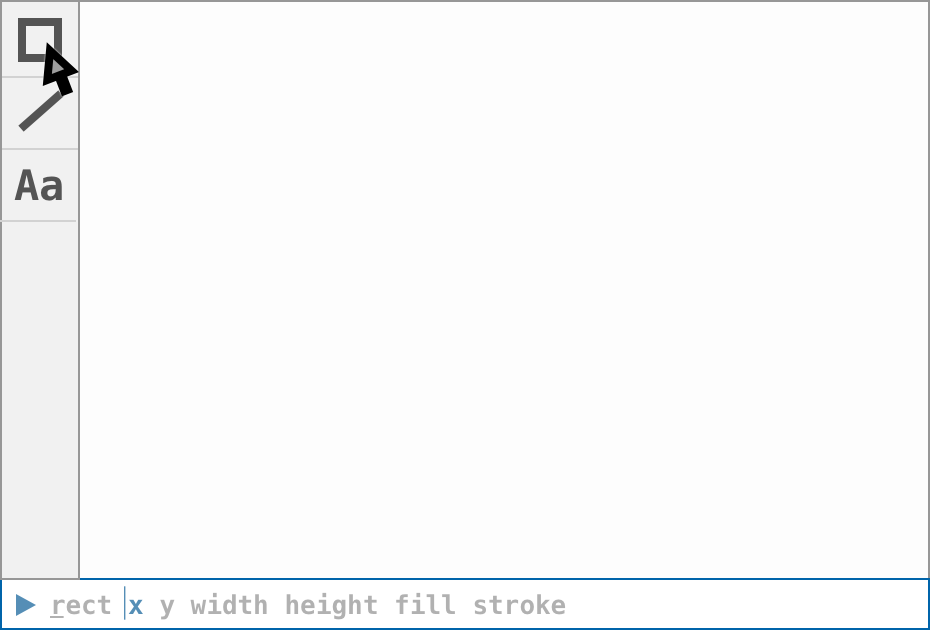
Potential, un-taken actions are shown greyed out, with as-yet unfilled parameters named and greyed out — in this case, the command for drawing a rectangle, shown as the user hovers over the GUI rectangle tool. A cursor and subtly highlighted parameter name show where keyboard input would start, were the user to start typing at any given moment.
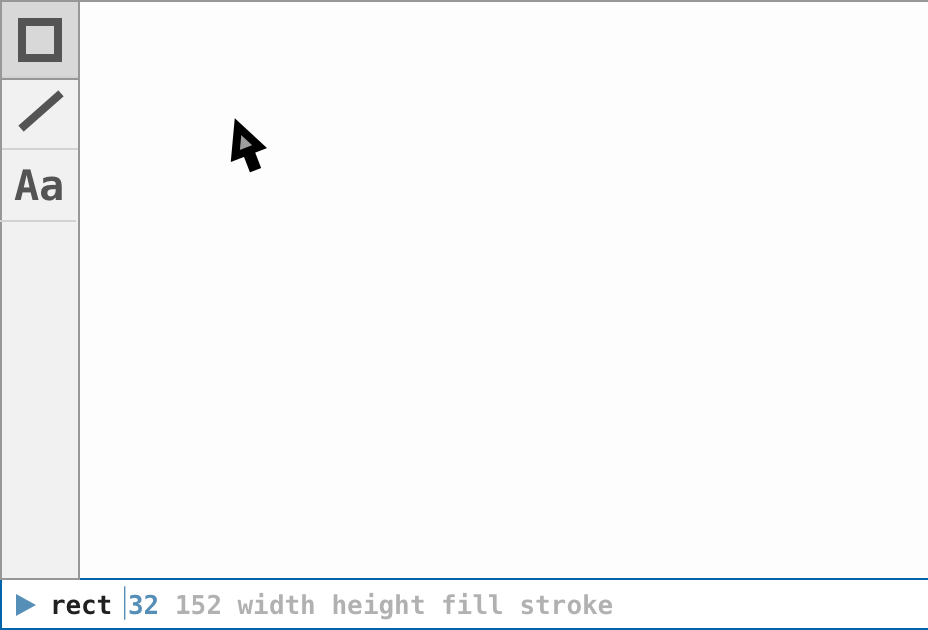
The user clicks on the rectangle tool, entering rectangle mode and solidifying the “rect” part of the command. The rest of the command remains undetermined right now, but the rectangle origin coordinates start to update, simulataneously offering the user information and an editing affordance.

The user clicks the origin point of the rectangle, solidifying the coordinates and moving the cursor and live-updating parameters to width and height. The position and command remains editable if the user switches to the text-based GUI, but are no longer the live-updating, immediately editable bit of information.
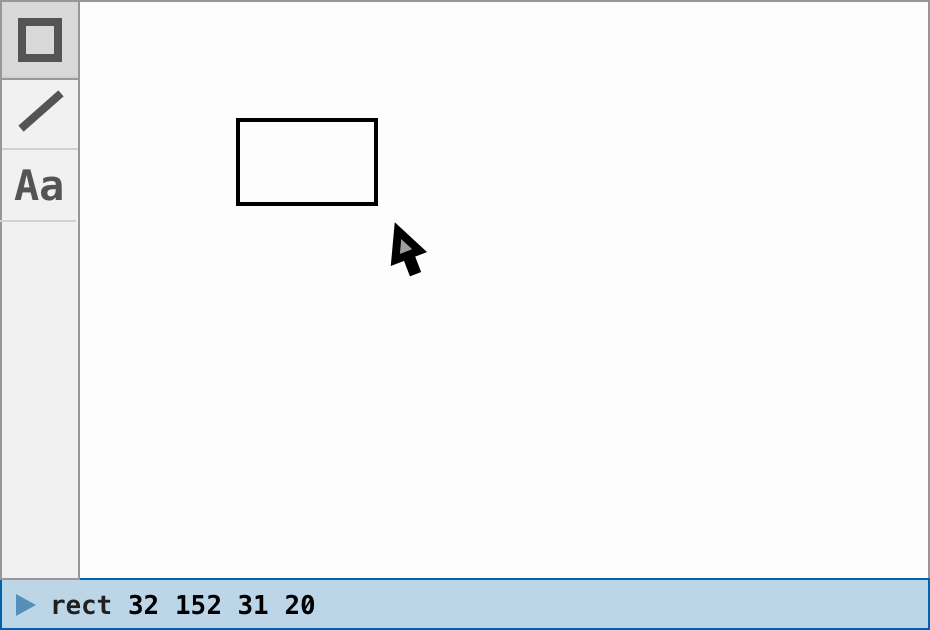
The user clicks again, ending the rectangle creation. The command becomes entirely solid, and the prompt quickly flashes to indicate that the mode has been exited. The application returns to selection/cursor movement mode, displaying coordinates.
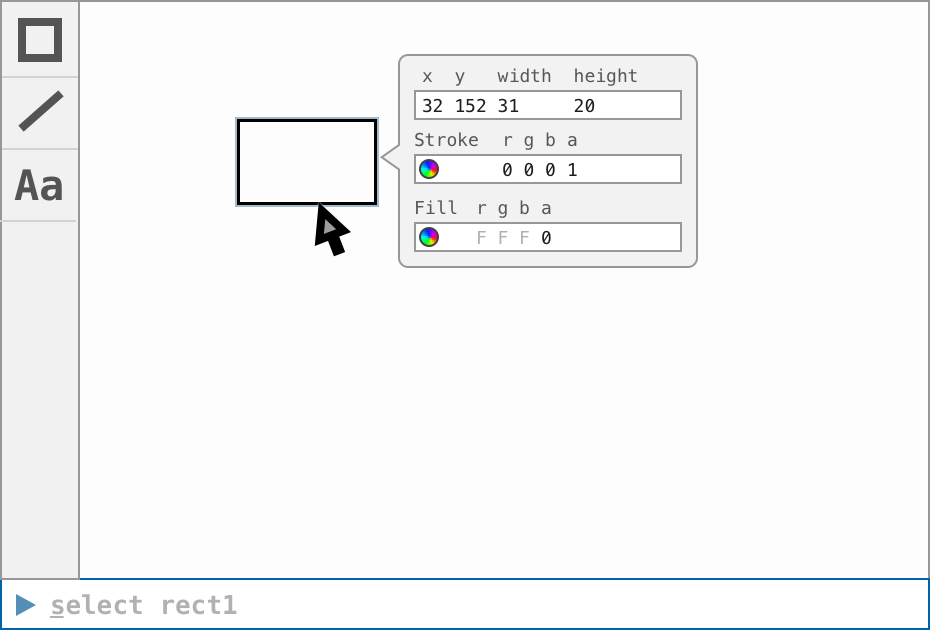
Hovering over a graphic shows how that graphic can be selected in the command line. The context panel menu shown when a graphic is selected is an extension of the idea, where editing paramters of the rect is done in a very similar format to the original prompt, retaining as much consistency as possible. The field names above the text serve as hints, and follow the parameters around as the lengths change. Parametric values within a field can be tabbed between.
This mockup is quite limited in scope, contains various beginnings of idea and many problems to be solved — for example, how to handle scoping of a command prompt? Is there only ever one, or can each window have its own? How to do history? Connection between applications? Multiple possible syntaxes? There is no end of issues which would only be able to be worked out in a practical working prototype.
However, I believe this sketch serves to demonstrate the most significant difference between this idea and existing hybrid UIs, or scriptable GUI applications: of the text-based and graphical interfaces of an application being highly coupled; the prompt acting as a high density read/write control which is learned through GUI interaction, and is useful as a status bar even if you never use it as a GUI.
This is one of several ideas for next-generation computing environments I have flying around in my brain, which I plan to blog about as and when I have the time to sketch them out.
If anyone knows about applications or software environments which implement this, or something similar to it, I’d be very interested to hear about it. Find my contact details on my personal site.
Thanks to Brennan Novak for encouraging me to blog about this topic.
 Al Power
  Barnaby Walters